

This tip isn’t strictly about earning more points but does relate to managing the payments from your points-earning credit cards more effectively. With some cards, paying in the original currency will save you money and perhaps even boost your points earn!
When buying items on websites such as eBay, you’re usually going to be using Paypal as a payment method. If buying from overseas sellers, Paypal defaults to converting the foreign currency price of the goods to AUD when using a Visa or MasterCard – but the exchange rate is pretty unappealing.
A number of Visa / MasterCard options offer bonus points on overseas transactions or no foreign exchange fees – and you’ll probably want to have Paypal set to the foreign currency, not AUD.
If you have a card like those in the list below, purchasing in currencies other than AUD should trigger bonus points, or waive the foreign exchange fees.
- The Citi Prestige Mastercard
- The Westpac Altitude cards
- The St. George Amplify Signature Visa
- The Bankwest Qantas Platinum or World cards
- 28 Degrees Platinum Mastercard – which offers no points but also no foreign exchange fee
Paypal makes this hard to change, and now you can only change it at the checkout. Previously, it was possible to make the change permanent through your account, but this won’t work anymore.
Changing your PayPal billing currency at the checkout
Switching the currency at the check-out is easy enough. You’ll just have to do this whenever you check-out. These steps may vary depending on the website interface you’re using, but hopefully it will be fairly similar across the board.
1. Select PayPal as the payment method and look for a link called ‘exchange rate’ or similar.
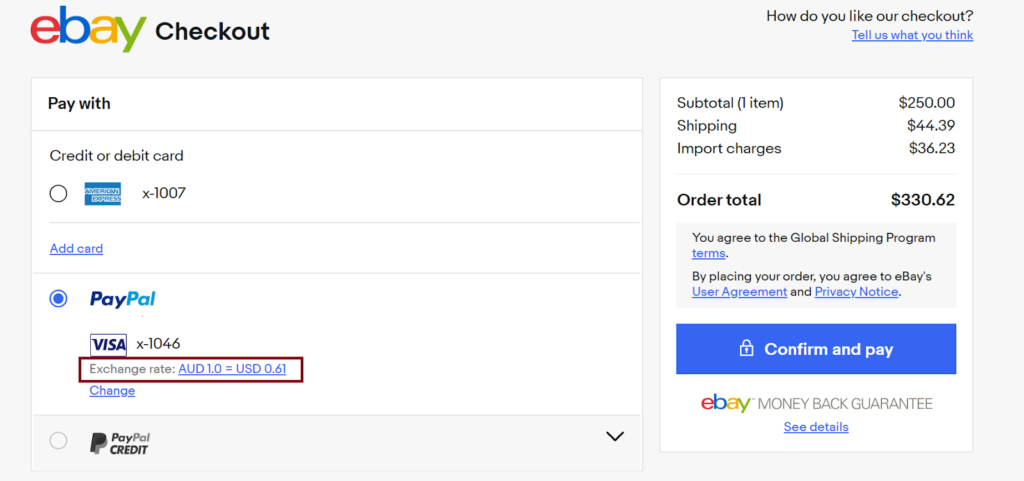
2. You will now be able to swap your payment currency from AUD to the foreign currency.
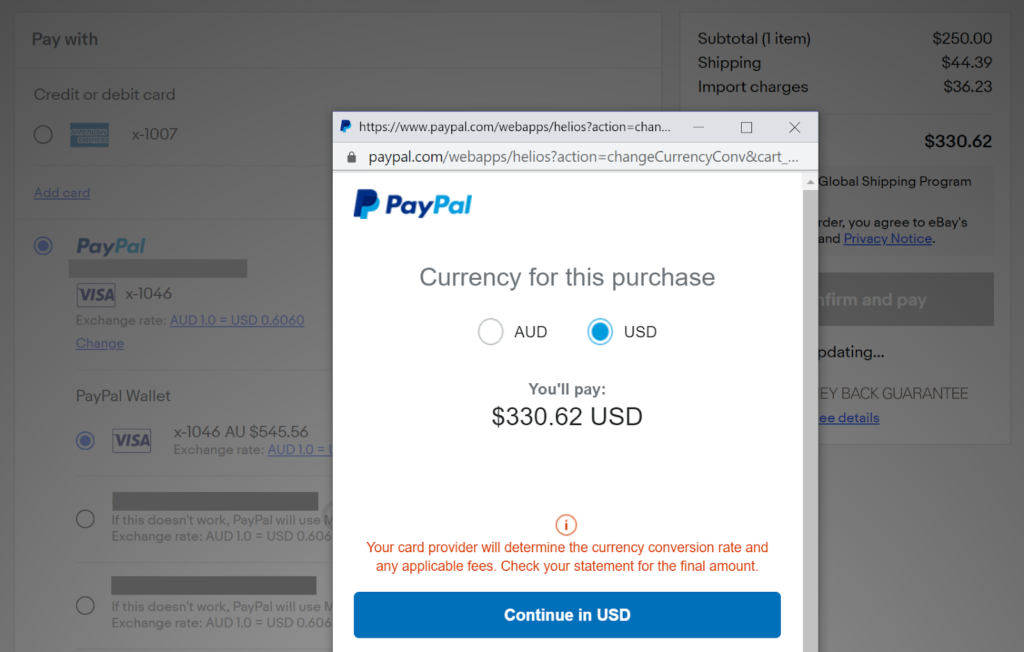
That’s all to it. In this example, PayPal wanted to charge $545.56 AUD for this $330 USD purchase, an exchange rate of 1 AUD to 0.6060 USD. While this would prevent any international transaction fees on cards that don’t waive it, the exchange rate is quite inflated.
By swapping the currency into USD and charging that to my fee-free card (in this case, the ANZ Travel Adventures Rewards card, which is a VISA card), I would expect to be charged around $523 AUD at the current VISA exchange rate (that’s $330.62 USD × 1.584).
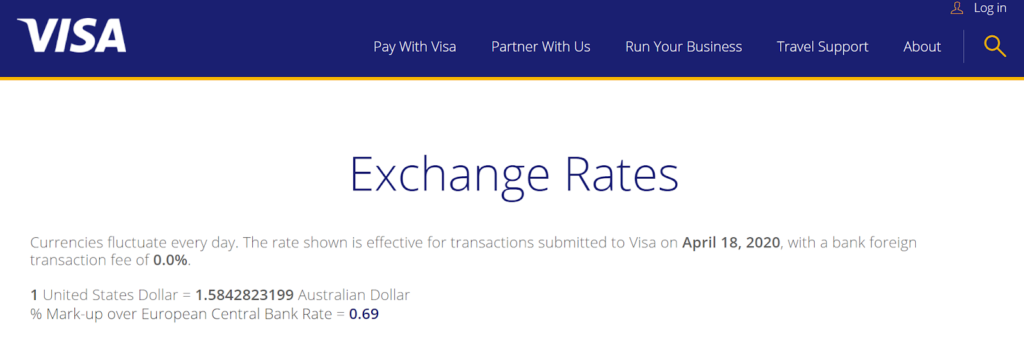
That’s a saving of $22 AUD from the PayPal rate, plus I still earn points on the transaction.
This setting is not available for American Express cards because Paypal and Amex are set up to always charge in the overseas currency, and Paypal won’t convert the charge for you.
However, for MasterCard and Visa options, this is a handy way to circumvent this setting in Paypal.
Changing your PayPal billing currency through your account
Unfortunately, it appears that it is no longer possible to permanently change your PayPal billing currency through your account. Right now, the only option is to change it at the checkout on a case-by-case basis.
The PayPal Australia User Agreement, version 20-1, as of 13 March 2020, states (emphasis underling mine):
When your payment is funded by a debit or credit card and PayPal determines a currency conversion is necessary, you consent to and authorise PayPal to convert the currency in place of your debit or credit card issuer.
In most cases, you may have the right to have your card issuer perform the currency conversion, if applicable for that card issuer and network. Currency preference selections may be presented to you in various forms, including a choice of which currency is used for the transaction, whether PayPal or your card issuer performs the conversion, or which conversion rate is used for the transaction, among others, and may be made available individually for each card and for each automatic payment agreement. If your card issuer converts the currency, your card issuer will determine the currency conversion rate and what fees they may charge.
PayPal will always perform the conversion for transactions where your PayPal balance or linked bank account is the payment method.
Summing Up
While PayPal is undoubtedly one of the most convenient ways to pay for things online, especially in international currencies, there is also no denying that they are profiting from overinflated fees and charges.
The company has removed the ability to permanently bill your cards in foreign currencies instead of converting to AUD, so you will need to manually select that option at checkout. Doing so can unlock the full potential of your points-earning credit card, especially if it offers bonus points on international transactions and no overseas exchange fees.
The changes to PayPal’s User Agreements also suggests that the company is looking at ways to even completely remove the ability to swap currencies down the track if they can get away with it. Hopefully, it doesn’t eventuate to that, though.
It is now possible again to set the currency for each debit/credit card or bank account in Paypal. I had this query and received this reply from Paypal:
“When you add a credit or debit card to your PayPal account, it’s often automatically registered as denominated in your local currency. This is our standard procedure as your card issuer doesn’t inform us what the actual currency is.
If you usually send your payments in the same foreign currency, you can avoid conversion costs if your card is denominated in the currency of the transactions you make.
To update the currency of your credit or debit card:
Go to Wallet.
Click on the card you wish to update.
Click Change in the ‘Currency’ section.
Choose the currency of your card and click Save.”
Pete, your post was 2 years ago! You may have been able to change the currency of a card back then, but now come January 2024 there’s no longer a ‘Currency’ section in ‘Wallet’ so it appears PayPal have now done away with that option so now what?
This might be useful for Ebay purchases but it doesn’t help for other OS purchases where the vendor has set up Paypal as the only payment method. When you go to checkout there is NO option to swap currency.
Steps for non-business account now are:
1. Login
2. Settings (cog icon)
3. Payments
4. Manage Automatic Payments
5. Pre-approved payments (at bottom of Suggested Sellers list)
6. Set Available Funding Sources
7. Conversion Options
Doesn’t work for PayPal’s own cards. Ridiculous that the PayPal Cashback MasterCard has no foreign transaction fee except when paying through PayPal. PayPal’s greed just means they lose a fee since I don’t use PayPal or use a different card
Many thanks, mate!
I’m not against Paypal making money – they do that every second of the day – but I hate when people (me) are tricked into being cheated.
I and only I decide when and to who my hard earned is going.
Thanks for the help
The steps are
1.Login to your Paypal account
2.Click Settings on the top-right of the page left of Log Out
3.Select PAYMENTS tab
4.Click Manage pre-approved payments
5.Click Set Available Funding Sources on the top-right of the list
Thank you so much!
I found the link despite the new HMI. It is: https://www.paypal.com/cgi-bin/webscr?cmd=_profile-merchant-pull-funding&buyer_hub
I purchased an item on fastcardtech.com for 136,38 euros after a lot of searching for best price. Paypal was my only option for payment.
When i redirected to paypal i noticed that the value was set in GBP and i was a little surprised, but i didn’t pay much attention cause in the past i used paypal and i was very happy with it..
When i finished the transaction i saw that my card was charged with 142,69 euros.
I paid about 7 euros to these thieves for unnecessary conversions.
Seller price and my cards balance was in Euros.
BE VERY CAREFUL!!!!
I just found out they were stealing for me too, hundreds (if not thousands) of USD per year. It was super hard to disable it, I remember in the past I was trying to disable it too but without luck. I will avoid paypal and ebay from now on and go to amazon because of those shady practices.
Oh my God! I cannot believe this.. like one year ago I could not find this option wherever I looked at and I asked paypal itsel via e-mail that I would like to pay with my credit card in the currency listed on the seller’s invoice and did not want them to change the currency to my credit card’s currency with their unfavorable conversion rates and they replied me there is no way to do it.. today I decided to search once more if there is any change on this policy or a way to do it and saw this! I really hate paying via paypal, but unfortunately some sellers do not have any other choice.. at least I could have changed the settings.. thank you very much..
Thank you very much. Paypal is so evil to do that.
Sure thing is that paypal is hiding this information to gain money more from you and us. No tips and recommendations coming from their company, the new interface hides all about the exchange rate when buying something unlike a year or years ago when there is still a choice button before checkout. I hope a new company comes and destroys paypal- a stealing evil company… SMH Tsk Tsk
Thanks so much! I was searching all over for a way to change or remove the default currency for my new 28 degrees card – especially since I have other credit cards linked to my PayPal account that I’d like to still use AUD by default. Glad I found your article – sorted it all out in a few minutes and your direct link to the PayPal settings was very helpful 🙂
Thanks! The PayPal rate is awful and during some updates they’ve changed this for me. I’ve always used the sellers currency.
I read this just after I had paid PayPal’s hefty exchange rate on a purchase from Europe (on top of Visa’s foreign transaction fees). Anyway, I used the link, made the change, but wasn’t sure it would work given the recent comments. However, I just had to to make another large purchase today and thought I would give it a go and it worked. PayPal was cut out of that piece of the action. Thanks heaps for this great tip. You’ve actually saved me quite a bit of money.
Ah glad I found this. Was paying OS purchases for my upcoming trip on PayPal to ANZ Rewards AMEX card. Noticed substantial variations in exchange rates so checked and found PayPal/AMEX always converts. Then looked to charge via PayPal to Bankwest MasterCard Platinum no conversion fee and thought had sorted from link in your post but then on reading further know that PayPal has made that a furphy. My final €4000 payment will be made direct via Bankwest MasterCard. The reward points come at too high a cost to justify.
I thought I was the only one having these problems, a few days ago I made a purchase on eBay using PayPal, I didn’t have any problems before but now they are making a currency conversions even though my account is in USD, when I checked my bank account statement the amounts didn’t match, they are stealing, they didnt know how to explain what they did with the money, my transaction was for $970 and my bank account statement says $1026.35. Does anyone know what to do? I contacted them but they don’t want to refund me that money, i showed them my transaction history with no currency convertions in the past, but they didn’t care. Do any of you know how could to sued them?
Cause that is stealing in my book
even that annoying manual change at each quick check-out is now unavailable
“Things don’t appear to be working at the moment. Please try again later.”
miraculously if you let them rob you it works flawlessly
Thank you – having already logged into Paypal, “The easy way” (clicking on your link then following steps 5 and 6) worked perfectly. Thanks so much for sharing this info in such a clear way!
Thank you very much! That’s the way!!!
nope does not work for me either now. The option is there and it thinks for a second but then goes back to paypal conversion :/
I can’t get it to charge native currency no matter what I try from the above – the paypal settings are set for ‘seller’s currency’ but it doesn’t make much difference, and clicking the exchange rate doesn’t work.
Has anyone had any luck getting it to work in the last couple weeks?
If you use Visa/MC, currency exchange is now enforced. Irrespective of conversion option you choose on PayPal (or through Ebay) they charge your card in AUD using their rates. The frustrating part that they display foreign currency charges, but still charge your card in AUD in the backend > just check your bank statement or online banking.
eBay checkout is trying to make this harder again.
Even if you change the settings in your paypal account as suggested here, the checkout process still tries to default to paypal’s (awful) exchange rate.
You need to click on the curency conversion next to the card you are trying to use, then it brings up another prompt where you can change it to bill in USD (which is desirable for those using 28 degrees card).
So basically, if doesn’t give you the default selection you make in the paypal account settings, but will enable it if you keep digging again.
ok since about a month i get constant currency exchange of paypal, this pissed me off as they litterly scam you with their rates! frikking paypal is ignoring this option even if you set it up right since a month orso!
solution, everytime you make a payment, click the blue currency exchange rate at the payment screen (shows below your credit card in blue letters) this gives a small popup then click on this pop up, after this you get the option, pay with paypal exchange or pay with cc bank exchange rate.
paypal keeps making it harder and harder to avoid their scam exchange rates!
hope this helps
Originally I bought an item on eBay via the ebay.ca web site and PayPay didn’t offer the option to use the credit card exchange rate after clicking the small popup. I then logged into eBay from ebay.com instead (using the same eBay login credentials I used on ebay.ca) and the small popup then contained a link to allow me to use the credit card exchange rate.
Just got off a a very frustrating phone call with Paypal. The rep insisted that this functionality is no longer available, even though we were looking at the page that has the option to set conversion options. “Tough luck” is the response I got, I’m always going to billed in my local currency.
How can they legally do this? They provide the option yet don’t honour it – they are screwing with my money and it is extremely frustrating. Waiting on a call back from a supervisor but don’t expect to get anywhere less aggravating there.
It’s useless, you can forget (for now) that you can pay in your bank currency!
I have the same issue, I have tried COUNTLESS times to change the paypal currency to banks currency and it does not work. Literally their making us pay their outrageous currency fees.
On ebay I have to manually change the currency EVERYTIME I pay for an item, and it works, but only on a desktop, forget mobile or app, no chance there.
Think about paying 10 items / day… you need to change it everytime!
I tried today to make a paypal from desktop, for something on paypal website. Went until the last step, changed the currency to my bank -> paypal refreshed the page and guess what, currency remained the same :)))
Tried about 5 times and gave up, paid in their currency, worked like a charm, wow ! :))
Now that’s what I call a ripoff and nobody can do shit about it.
I know that hidden setting, it worked if you always changed it prior payment few weeks back.
NOW IT COMPLETELY IGNORES THE SETTING
SCANDALOUS
REMEMBER THEY ALSO KEEP HUGE AMOUNTS FROM THE SELLER
HOW MUCH THEY WANT TO STEAL FROM EACH TRANSACTION – 20%? 30%???
PURE GREED
THIS NEEDS TO GO PUBLIC BIG TO MAKE ANY EFFECT
This is a PayPal scam, I would say it fraud. They aren’t notifying the buyers of the fee (4-5%) just adding it on top of the purchase price. No matter what you do there’s no way (online) to avoid PayPal converting it and charging you the fee. Currently only way to avoid is to call them for each purchase so they can turn it off each time.
I have 2 VISA cards from different issuers,and maybe in last 2 week ,this option does not work at my cards…
“Bill me in the currency listed on the seller’s invoice.”
This option still exist,but I think,does not work anymore.When I change to other option
“Use PayPal’s conversion process to complete my transaction using my card’s currency. ”
with disasterous Pay Pal exchange rates,I can pay the invoices,but already converted in my local currency (Croatian kuna’s). For example middle rate of EURO is 7.50 kn,and Pay Pal exchange rate is 7,84 kn.
Does anybody else have the same problem ? It is happening,after Ebay and Pay Pal splitting…
Why that other option for charging credit cards in USD,Euros,GBP…is still there,but not works any more? In if you try to contact Pay Pal…there is no direct e-mail adress,only millions of FAQ which could not help to anyone.
Is there a still chanches to charge my credit cards at exchage rate of issuer,or we all have to pay this disaterous exchange rates of Pay Pal and theirs fees..
Looks like even though the option is still on the PayPal site, neither eBay or PayPal allow you to be billed in the overseas currency anymore. It is now ALWAYS converted to your local currency.
I rang PayPal about this before I hit submit and they changed the currency on my credit card on the fly to the local currency to force it to bill in the local currency (and then changed it back).
They are misleading people now, esp. on eBay as you get given an approx. price when viewing the item but the actual amount charged is 5% higher.
Didn’t work for me though.
Still shows my local currency :/
Thank you so much for this advise Keith!!! I could not find how to change the setting anywhere in Paypal but your link worked. I use a Visa Travel Money Card preloaded with USD and GBP but Paypal still wanted to convert to AUD. Works a treat now and I can preload when the exchange rates are good. Thanks, Sue
20/10/2016 – PERSONAL ACCOUNT
The paypal chekout page no longer has the option to change the conversion options. By default you use PayPal’s conversion. They make huge money with this.
They don’t want us to know how to change to “Bill me in the currency listed on the seller’s invoice.”
I talked to them (via email) and they didn’t give me any solution, so that I would continue to pay with Paypal’s conversion.
SOLUTION, after searching, searching and searching:
Login to Paypal account (you are in the page “SUMMARY”
2.Right side of the page there are two icons:
one bell (stands for “Notifications”)
one gear (stands for “settings”)
click on the gear “settings”
Then there is (from left to right):
Account / Security / Payments / Notifications
click PAYMENTS
Left side there is “Manage pre-approved payments”
click in it
In the next page “My preapproved payments” there is a rectangle, a text box.
In the right side of the box there is on blue and underlined the option:”Set Available Funding Sources”
CLICK ON IT!
Next page: Manage Funding Sources
In front of the credit/debit cards you will find blue text underlined that says “Conversion Options”
-CLICK ON IT!and we are almost there!!!Jesus thanks
At last but not the least we are on “Conversion Options”
you just have to CLICK on “Bill me in the currency listed on the seller’s invoice.”
You choose the The MasterCard and Visa currency conversion process.
ALL DONE! MONEY SAVED! GOOD SHOPPING!
AND THAT IS ALL FROM PORTUGAL!
Thanks for the hilarious but helpful explanation! Thanks, from Australia 🙂
brilliant – thanks – I would never have found this on my own.
for anyone in the UK: look at the Revolute mastercard that does currency exchange at the goolge spot rate !!
Thanks heaps!!
Thanks for this, just what I needed to use Paypal optimally with a 0% foreign transaction fee credit card (Canada).
Thanks for the article. I’ve followed that and will see if it works. I picked up on this earlier and using iPad was able to change what I was buying back to Euros. I kept a record of the AUD PayPal wanted to charge me and what ended up on my Bankwest Platinum MasterCard. Sizable difference! It was around 4% so even if someone has a credit card that charges international currency fees, you may be better off in the foreign amount. When I got my Bankwest statement I found they caught me another time with USD unaware. Felt like complaining as I think it’s a sneaky practice. But not sure it’s worth complaining over a 4% and a few hundred points.
Thanks for this article Keith – PayPal told me there was no way to do it when I called and emailed them in the past – I was sure there was a way.
Thanks Keith and all other contributors.
Don’t know why PayPal has to make it so difficult (other than to make obscene profit on FX rate by ripping off unsuspecting PayPal users?)
However, I DID cancel PayPal payment and made direct credit card payment last time when I couldn’t figure out the currency conversion change option.
OK only works for Visa and MC…must have missed this. Will try again
Hi,
this is great, followed these steps but not getting the “Conversion Options” not sure why (I have a personal account, not sure this is the problem…)
“Logging into my (personal) PayPal account.
Clicking the cog button (Profile) to the left of the Logout button.
On the Profile page, scrolling down to Payment Settings and clicking Pre-approved payments.
On the My Pre-Approved Payments page, clicking Set Available Funding Sources.
Lastly, the Manage Funding Sources page allowed me to click Conversion Options to change the setting you mentioned.”
🙁
This is definitely for Visa/MasterCard (not Amex)? Not sure why otherwise :/
I use my ANZ Amex to pay for goods from Chinese sellers every month in USD via Paypal, the conversion rate is cheaper than the bank and I get stacks of FF points as well.
Thanks a lot mate, saved me heaps!!
It is now virtually impossible to find it, but this direct link still works:
https://www.paypal.com/us/cgi-bin/webscr?cmd=_profile-merchant-pull-funding
Thanks, updated and republished the piece with this!
Thanks heaps 🙂 The steps/screen grabs are now outdated, but the principles are the same. It bugs me that PayPal have this setting buried where they do.
Thanks a million!
I was on the phone with two Paypal reps and one Ebay rep and no one could figure it out. Back in the day, the review page would take you to Paypal where you could select those currency options on the fly. With the new system and separation of Ebay and Paypal, that no longer occurs. The review page stays in Ebay so there was no longer the option to select it on the fly. My older cards where I had already previously selected a preference were unchanged, but I was unable to change it for my new credit card for a few months. This solved that for me!
FYI For anyone who is having issues following these directions, it’s because Paypal currently has a sort of hybrid new and old site. I found it be following these steps: Click wallet at the top; scroll down to the very bottom and click Classic Site at the bottom left; The site will change and from there you will be able to follow along from Step 2.
Thank’s.
Work’s for me.
Mauricio.
Hi All,
It’s abit trickier than outlined above.
One key and important component has not been mentioned.
If you sell something like I did on eBay, and you have AUD$200 in your PayPal account, then afew days later you purchase something for USD$100. PayPal will NOT LET YOU CHOOSE ANY OPTION, the funds are automatically taken from your AUD$200 PayPal account, and PayPal performs the conversion and you have not say in it! The above information is only valid if you have no money in your PayPal account and the funds have to come from a credit card.
Regards,
Tom
Thank you so much for the tip.
PayPal really takes a big chunk as a seller or even money transfers.
But then the bank will charge me the foreign currency conversion fees, typically 3%, correct? I remember doing this once and got hit by it because PayPal requested the bank to process the transaction in USD.
That’s the case – but often there could still be marginal gains to be had by using your bank’s conversion instead as Paypal’s is usually at least as bad, if not worse. But the only way to check is to use the MasterCard / Visa XR from their respective websites (or your bank’s site, if they offer this) and apply the surcharge for your card to that, and see how it compares.
But yes, the most gain from this change is for those who have no FX fee cards or cards with overseas transaction bonus points.
Thank you, this is very helpful, I’ve just updated my settings.
Great for Keith to blog about it. I am cherishing the potential points haul as I have heaps of foreign currency payments and a card that awards 5 ppd per dollar spend. Thanks Keith
Excellent article. Never knew that this was going on but a quick check of my VISA statement showed that I was indeed being billed in AUD for foreign PayPal txns.
For me, I found these settings by:
Logging into my (personal) PayPal account.
Clicking the cog button (Profile) to the left of the Logout button.
On the Profile page, scrolling down to Payment Settings and clicking Pre-approved payments.
On the My Pre-Approved Payments page, clicking Set Available Funding Sources.
Lastly, the Manage Funding Sources page allowed me to click Conversion Options to change the setting you mentioned.
Thanks for the info!
Excellent..done it..thankyou
I find your articles great value
Thanks Again
Thanks John!
Hi Keith,
Great tip although currently this process seems to be different on my standard user account, possibly because you have a business account with PayPal?
Thanks Alex – did you manage to find it in your personal account? If so how different was the process?
I found this buried in a forum somewhere so figured it was worth sharing, and the steps there were the same as for me.
Hi Alex and Keith,
It is still doable with Personal Account. I just set it up. You have to navigate to “my Pre-approved Payments” webpage where it will list your ongoing payments within Paypal.
In the webpage you have a hyperlink to “set available funding sources” or “manage funding sources” where it lists your existing credit cards and conversion options. The next steps are as mentioned by Keith.
Alternatively for personal accounts – go to Payment Settings ->Payment preferences-> which will lead to ->paying online (under which you have “pre-approved payments”). Follow above steps from there.