

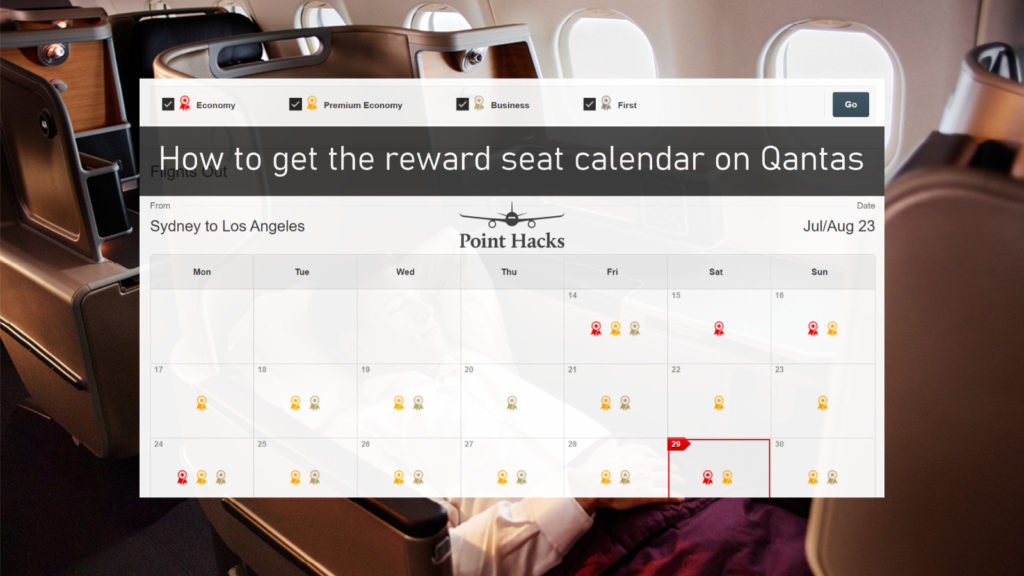

One pet peeve of budding Qantas Frequent Flyer members is the difficulty of finding reward flights. The default Qantas website booking engine doesn’t always show all of your options. But luckily, there is a hidden way to access the booking calendar which offers a clearer view of when seats are available.
It’s not perfect (for various reasons we’ll go over later), but it’s still an excellent way to begin your search. Here’s how to optimise your search with the reward seat calendar, using the multi-city booking tool.
How do I find the Qantas reward seat calendar?
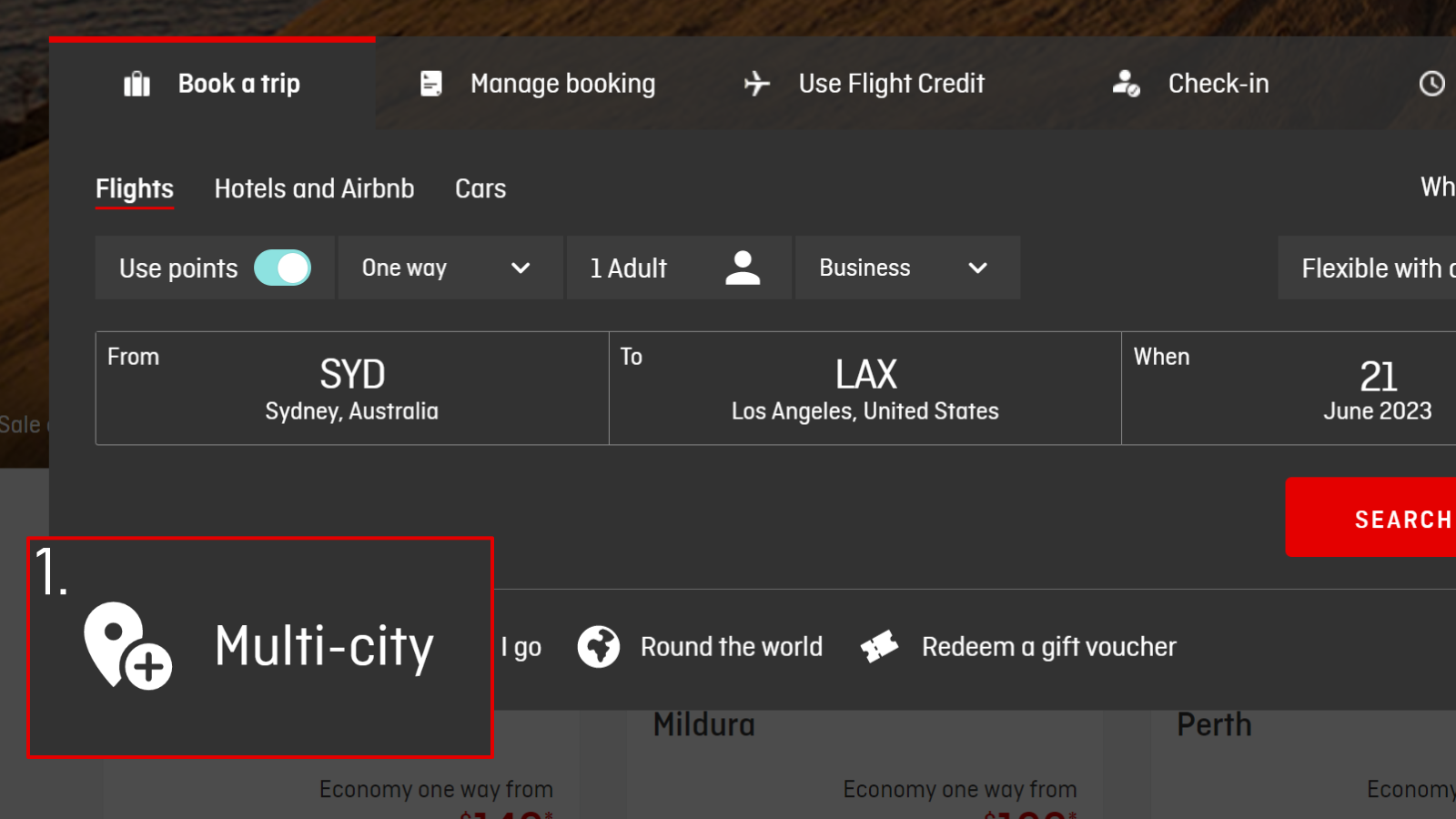
It’s actually very easy to access the reward seat calendar. You can do a search in three steps.
- Go to the Qantas multi-city booking page and log in.
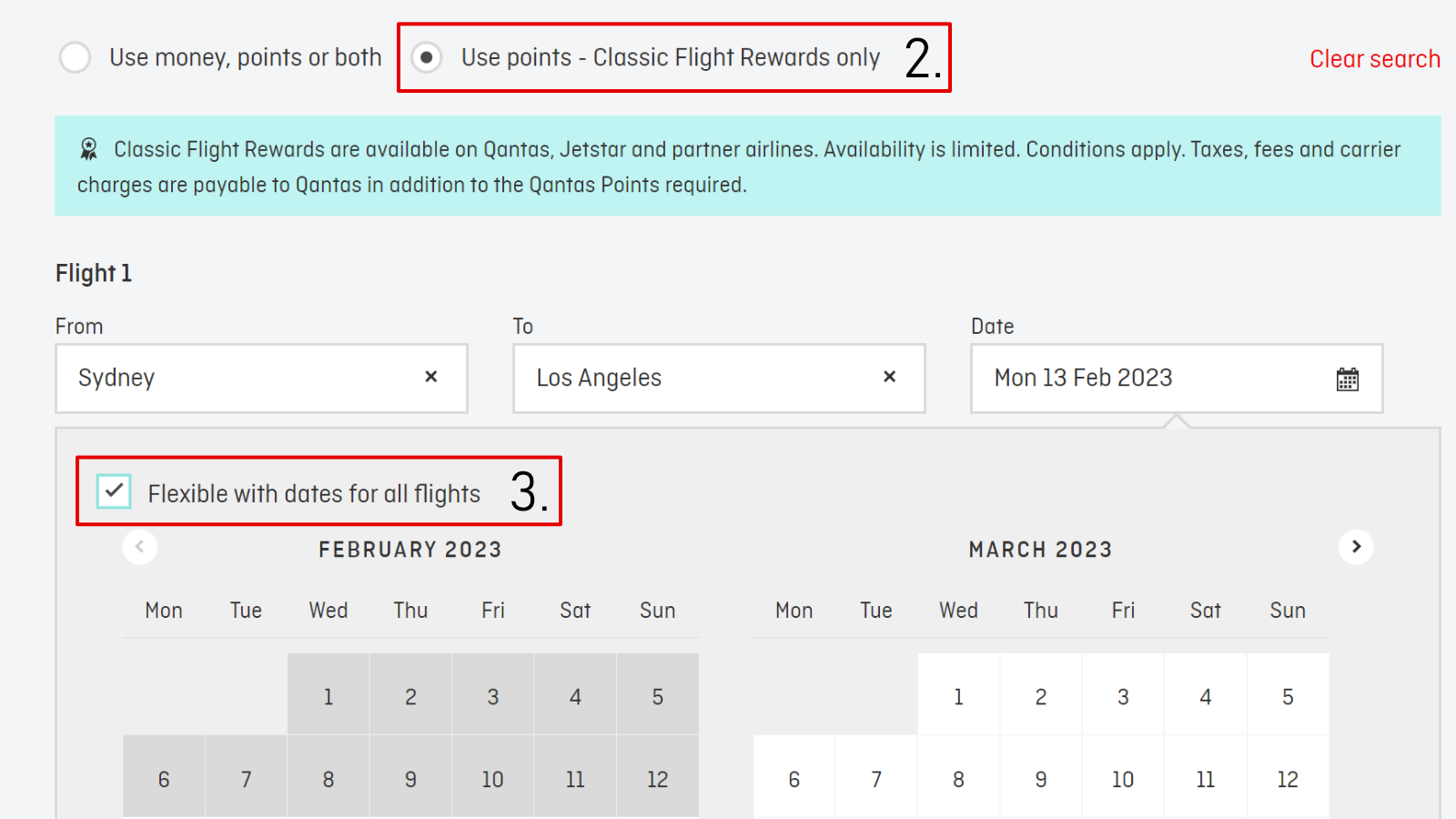
- Enter your desired flights and click on ‘Use points – Classic Flight Rewards only’.
- Important: When choosing dates, tick ‘Flexible with dates for all flights’.
If available, flight rewards will show up as ribbons denoting the class of travel. The key to getting the calendar view is ticking the ‘Flexible with dates’ box. If you don’t, then the engine will only return results for that particular day.
How do I use the Qantas reward seat calendar?
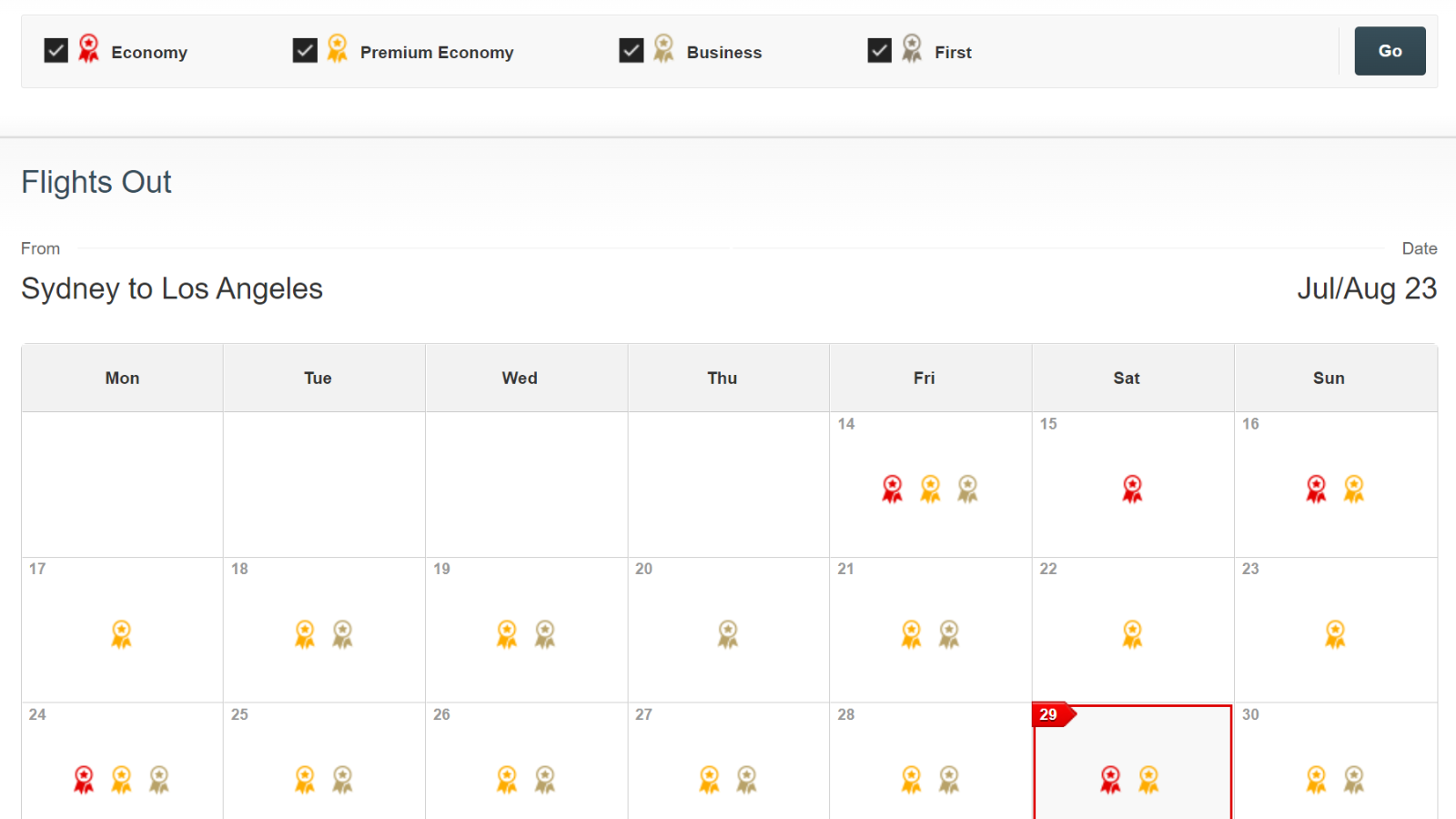
If successful, you’ll see a calendar that’ll look similar to below. The colours of the ribbon give a quick view of what flights are available. You can also filter by class. For example, if you only want Business and First rewards, then untick Economy and Premium Economy and click ‘Go’ to update.
What are the downsides of the Qantas reward seat calendar?
The main issue is one that has been plaguing frequent flyers for years – the calendar will also show mixed-cabin rewards, where perhaps the shorter flight is in Business Class and the longer flight in Premium Economy or Economy. Unfortunately, there is no easy way to filter out these results on the Qantas website.
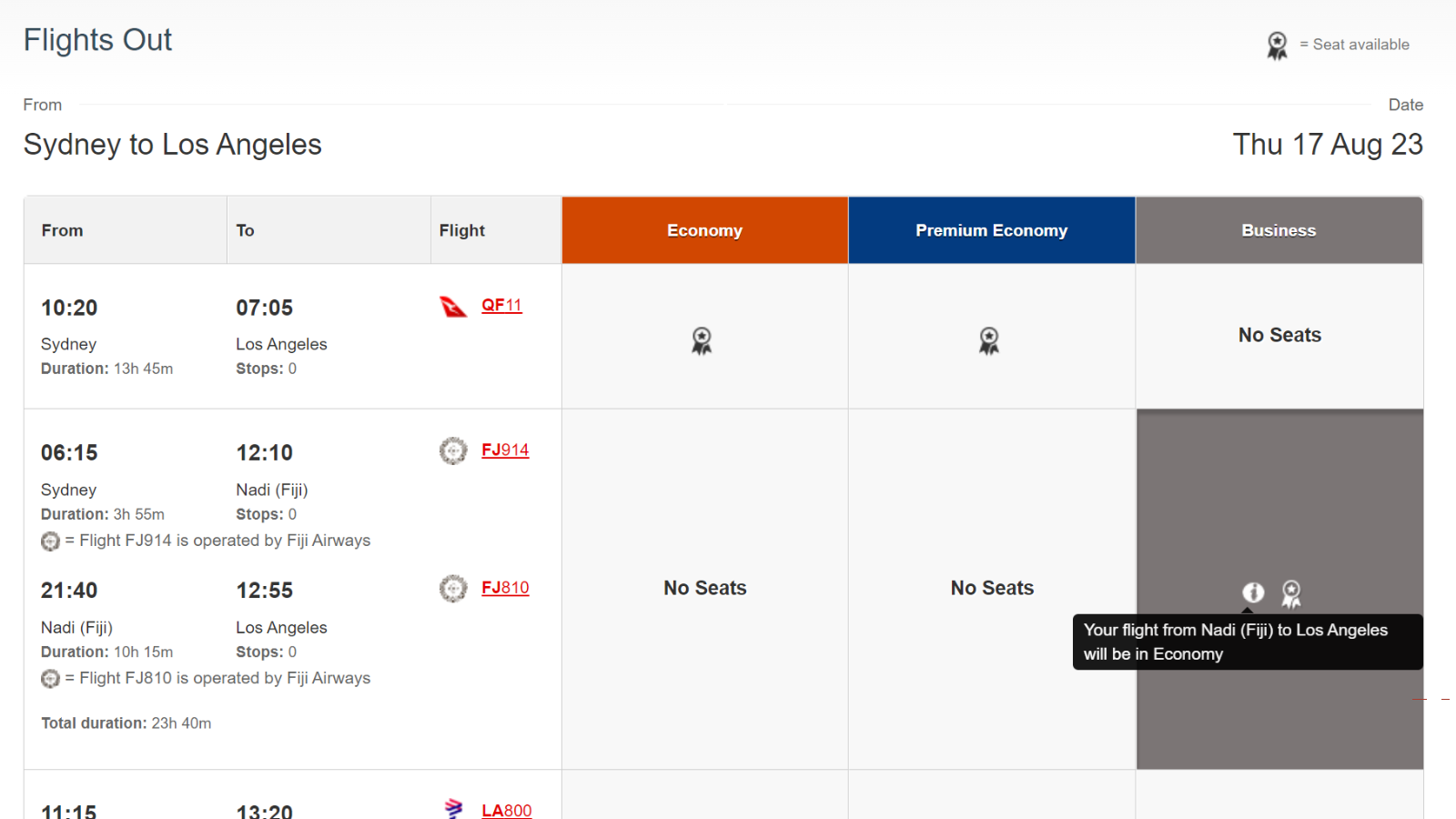
(You may have more luck on the American Airlines AAdvantage website, which lets you filter by the number of stops and cabin class).
You also can’t see the fees and taxes payable unless you have enough points for everyone in the booking, so it makes researching reward seats a bit harder if you don’t have all the points yet. If possible, try searching for just one seat first so you can see the fees and taxes per passenger.
Qantas American Express Ultimate

Offer ends: 17 Nov 2026
- Bonus points
- Up to 120,000 bonus Qantas Points¹
- Annual fee
- $450 p.a.
- Earn
- 1.25 Qantas Points earned per $1 on eligible everyday purchases. 2.25 Qantas Points per $1 spent on selected Qantas products and services in Australia. 0.5 Qantas Point per $1 at government bodies in Australia. After a total of 100,000 Qantas Points is earned in a calendar year, the everyday earn rate will change from 1.25 to 1 Qantas Point per $1 spent.
Qantas American Express Ultimate
Offer ends: 17 Nov 2026
- Bonus Points
- Up to 120,000 bonus Qantas Points¹
- Annual Fee
- $450 p.a.
- Earn
- 1.25 Qantas Points earned per $1 on eligible everyday purchases. 2.25 Qantas Points per $1 spent on selected Qantas products and services in Australia. 0.5 Qantas Point per $1 at government bodies in Australia. After a total of 100,000 Qantas Points is earned in a calendar year, the everyday earn rate will change from 1.25 to 1 Qantas Point per $1 spent.
Earn 70,000 bonus Qantas Points¹ with the Qantas American Express Ultimate Card when you apply online by 17 November 2026, are approved, and spend $5,000 in the first 3 months. Plus, an additional 50,000 bonus Qantas Points when you spend a further $5,000 on eligible purchases within the first 3 months of your second year Card Membership. New Amex Card Members only. T&Cs apply.
Summing up
The Qantas multi-city calendar is hidden away, but with a few clicks, you’ll be searching for reward flights like a seasoned traveller. Make sure to tick ‘flexible with dates’ to access the calendar, and watch out for mixed-cabin rewards. Those will throw a spanner into the best-laid plans.
You can also string together multiple flights into one booking with the multi-city tool. This can be handy if you can’t find reward flights on a certain route (i.e. Sydney-Paris), but you can find seats on different sectors and different airlines (e.g. Sydney to Singapore with Qantas, and Singapore to Paris with Air France).


I am using Chrome and I also do not see the “flexible with dates” option. I have tried incognito mode with no joy.
+1
It usually not always won’t present a Rewards toggle so only returns commercial fare results. And even on that page (unlike a conventional non multi city search) won’t usually offer a Rewards toggle.
THE REASON: IT DEPENDS ON THE PORTS YOU ARE ENTERING. So not quite as simple hack as suggested.
Thank you for this guide, very handy.
Does Virgin offer a similar site to find reward bookings?
I use the multi-city search all the time – it was much easier though when it ‘remembered’ your last itinerary. You could then resume a search with one or two minor alterations or do a deeper dive on some of the dates. Nowadays previous itineraries are cleared and you have to reenter all the details. ( I assume others have experienced this?)
Hi Brett, you are correct and this has been the case for probably a year or so from memory.
Hello, I’m only seeing the ‘flexible with dates’ tick box on the initial black search option. When I choose Multi city there is no flexible with dates option?
Hi Nicole, please take some screenshots of the problem and link to them in your comment or on our Community forum. It would be good to see the issue as it’s still working perfectly fine for me.
Please see my answer. It really doesn’t tend to play nice ex-Australia (a cynic might say it’s due to QF wanting to preserve commercial fare revenue).
I find the ‘best’ method is to choose your starting port in, say, SIN BKK HKG NRT HND if trying to reach a European destination then confronting the reality of buying a fare outright from Australia to that transfer hub. Causes havoc of course trying to align everything not to mention prospect of having to recheck bags and pass out and back through security. Ugh.
Is there a similar way to search for Velocity reward seats? I am particularly thinking about going to America end of this year and using points but not sure the best way or site to plan this on. Should i be using United?
Thank you so much
I remember this tool from years ago, and thought it had completely disappeared.
Great to know it is hidden away behind the multi-city search.
I also don’t have the flexible date option when i select classic rewards. I noticed this stopped for me sometime last year. I do have the flexible dates option when i choose “Use money, points or both” however it doesn’t show in calendar view.
Is this process still applicable, i.e. I’m not seeing the ‘Flexible with dates for all flights’ tick box option once I get to the Multi-city flight’s page – only for return flights?
It’s still working fine on the multi-city page – just tested. Make sure you’ve also ticked ‘use points’.
If you’re still having issues, please take screenshots and post a question on our community forum.
I’m not seeing ‘flexible with dates for all flights’ either. I know how to use the multi-trip tool but it’s not showing. Perhaps because I’m using Chrome??
This is odd, I always use Chrome and it still works today. Try a different browser, incognito mode, clearing cache etc and see if that helps?
Brandon,
After much frustration and over 40 calls to 131313 (mainly answered by Fiji and Manila, but some by Cape Town and once by New Zealand) I finally booked and paid (by points and cash) an around the world classic rewards flight for 2 in business class.
Then JAL cancelled my flight from Tokyo to Helsinki, but offered a flight the following day. Helsinki was just a transit to Edinburgh, so my connecting flight no longer connects. Over the past 11 days, I have further rung Qantas on 27 occasions trying to get alternate flights. When JAL originally cancelled my flight, I used the Qantas multi-city tool to look for alternative flights and Finair (One World Airline) had a suitable flight and showing at least 2 business class seats. I rang 4 times trying to amend my booking to Finair. 2 calls answered by Fiji and 2 by Manila, all different consultants. I was told by 2 consultants that I cannot change airlines, and by another 2 stating an email would need to be sent requesting the change taking 24 to 48 hours.
I requested the email to be sent and waited. I noticed the Finair business class seats after approximately 24hr no longer showing in the multi city tool and I assumed they had been given to me. I rang back after 72 hrs and no, seats were not available. I asked to speak with a supervisor and was told the supervisor had to be requested by email and would then call back in 24hrs. That was 5 days ago and no call. I also submitted an online complaint but nothing on that yet. Ringing Qantas switchboard in Sydney I was informed all reservation and Customer Care staff are overseas. No staff are available to assist me in Australia. Last night on my latest call I offered the consultant an alternative flight from Helsinki to Edinburgh gained from the Qantas multi city tool via Stockholm and London, but the consultant said there were no seats at all on those flights but the Qantas tool listed both business and economy seats available. The consultant stated I cannot rely on the Qantas website for international flights. I have to call reservations.
The staff have been very courteous, so I have no complaints about staff.
What I have just described is but one issue with my booking.
Any suggestions?
Hi David, sorry to hear about the drama you’ve gone through. What you’ve described has been a fairly regular occurrence and well-documented elsewhere, such as on our sister site Australian Frequent Flyer. It sounds like you’re taking all the right steps to find alternatives, the trouble is getting it re-ticketed. If you haven’t already, I suggest you have a read of this thread and email [email protected] with a concise summary of the alternative flights you wish to change to.
Mate, hit them up on Facebook , they hate that – they are more concerned with their social media image than looking after customers then the traditional way of basic flucking customer service per well trained staff.
Oops – QF sacked 100s of local call centre staff – maybe that helped to pay the CEO’s multimillion dollar bonus that year.This is typical of the consequences- zero customer service.
The home-based QF agents are exceptional, but the rest are close to utterly useless. If you’re not Platinum, PlatinumOne or Chairman’s Lounge it’s best to keep your redemption bookings as simple as you can possibly can so you can manage online.
In your situati0n, I would seriously consider cutting my losses, cancelling the whole booking, recover all of those points and start again, dividing the trip into sequential bookings to maximise flexibility. Sorry – I know that’s not what you want to hear and it may not be practicable for any number of reasons.
Ask questions if you like….
I have lots of Qantas points and struggle to easily book business class reward flights. You seem to suggest I may have more luck using the American Airlines AAdvantage website. Surely I can only use American Airlines if I have their points. Can I log onto their website and use Qantas points?
Hi Richard, our guide on this will make things clearer. Essentially, you can use the American Airlines website to search for flights operated by Qantas and partners that both AA and QF have in common, such as oneworld member airlines and Fiji Airways. There are advantages to using the AA website to search, including a more comprehensive calendar that can specifically look for non-stop flights in the cabin class of your choice (thus avoiding the mixed-cabin itineraries). If you find any appropriate options on the AA website, you can then check that flight on the Qantas website and use Qantas Points if the same flight is available for booking.
Whilst that’s good advice in theory, Brandon, it ain’t gonna work in the event that Qantas releases award seats to its own members that cannot be either accessed or searched for through partner websites such as American Airlines AAdvantage.
IME this is the norm. So in practical terms the best advice is to continue to struggle through using the QF website if you want QF award seats.
If you are looking for non Qantas award seats (released by partner airlines) then fine, AA can obviously be a helpful option to locate those seats and book the, subsequently on QF.
Worth mentioning also that you don’t have to log into the AA website or Alaska Airlines website when searching for OneWorld partner – this is different to the QF and BA websites.