


Most Popular Cards
You Previously Viewed These Cards


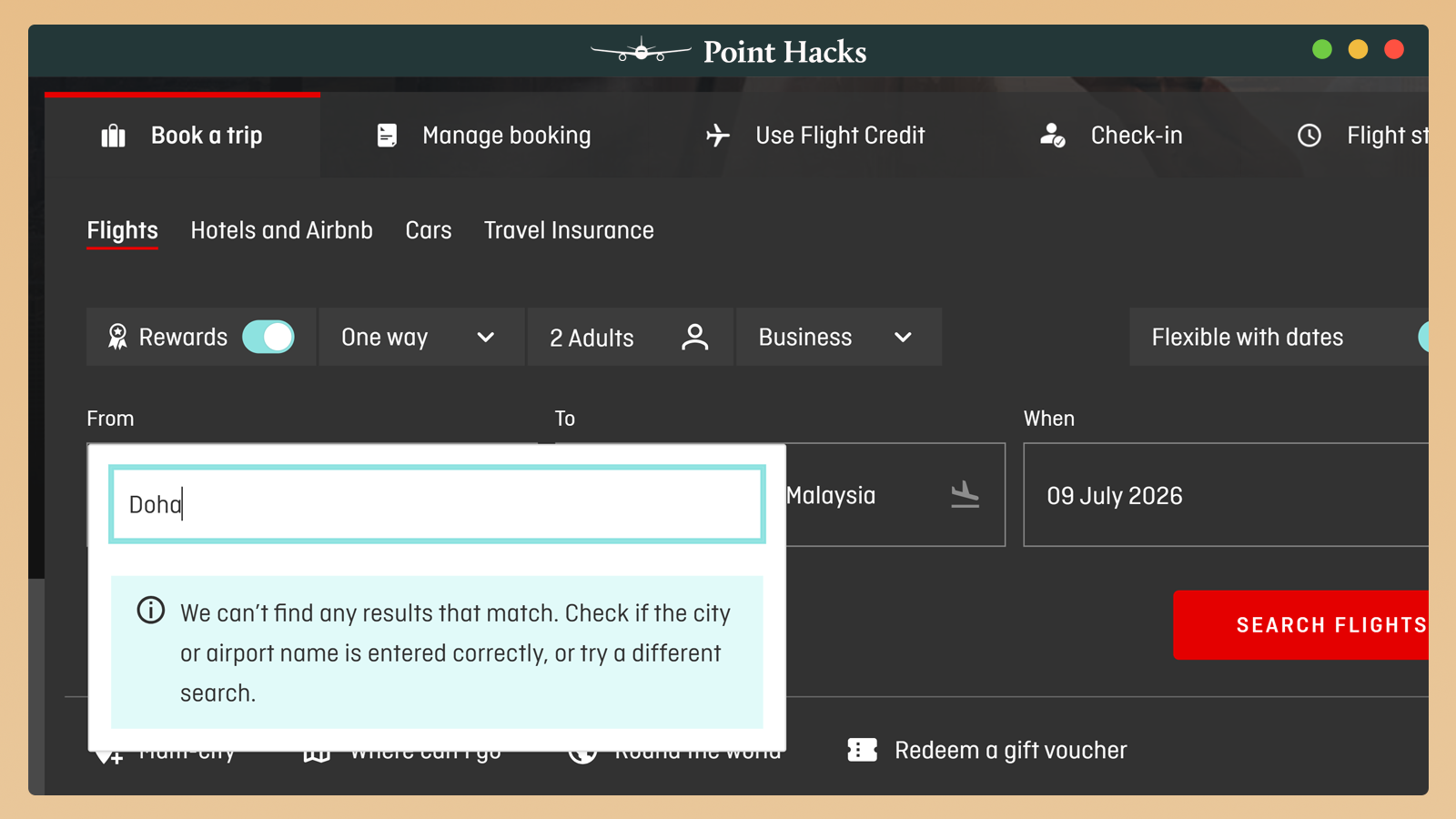
A problem you might encounter when searching for reward seats with Qantas Points is that the website won’t accept your origin city. Doha? No chance. Split? Colombo? Nairobi? Computer says no.
That doesn’t mean those cities don’t exist in the Qantas system. You can usually book flights to those destinations. But the Qantas website prices bookings based on where you start your itinerary. If it’s in a country they don’t support in terms of currency, you’ll reach an error. Here’s how to get around it.
Which city origins can’t be used on the Qantas website?
The list of countries that Qantas Frequent Flyer can’t accept payments in includes (but is not limited to):
- Africa: all countries except South Africa
- Asia: Cambodia, Laos, Nepal, Sri Lanka, Vietnam (often errors out) and most of Central Asia
- Europe: most of the Balkans, as well as Cyprus and Malta (even though they use the Euro)
- Middle East: most countries except the United Arab Emirates and Oman
- Pacific Islands: Cook Islands and Tahiti (often errors out)
- South America: Colombia, Ecuador, Peru and Uruguay
How do I book reward seats if I can’t do it online?
Tip #1: Search using a different leg first
Even if you’re looking for a one-way redemption, perform a search from a country that does accept payments for a return trip. Use the multi-city search tool, and select ‘Book with Rewards’. Enter a ‘throwaway’ route as the first flight and then the route you actually want to search as the second flight.
For example, one-way searches from Doha are not permitted because Qantas can’t accept payment in Qatari riyals. However, you can just put Sydney-Melbourne as the first flight to initiate the search and then ignore those results.
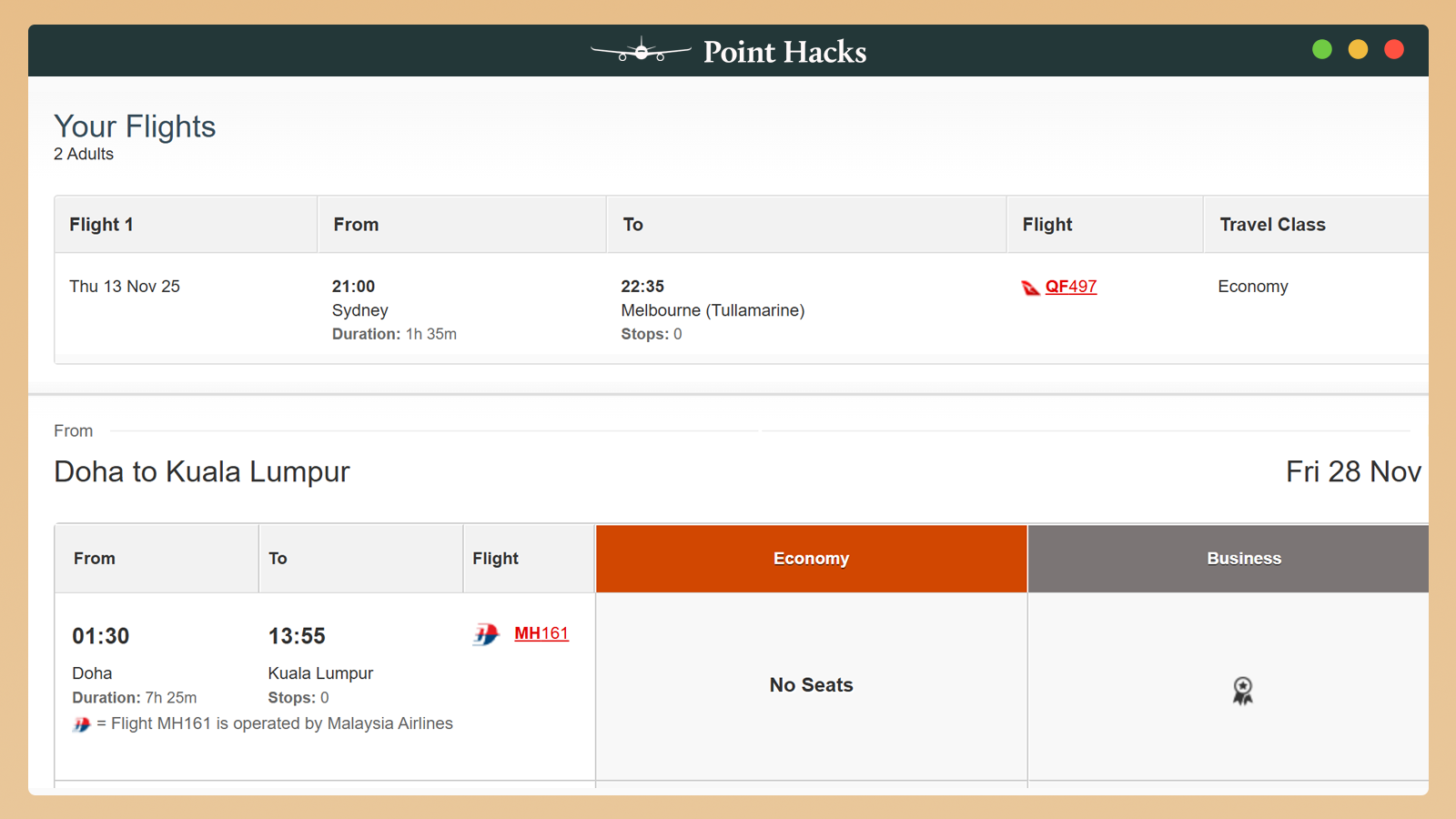
This way, you’ll get an idea of availability on the leg out of Doha. Once you’ve found the flight you want, you can skip ahead to Tip #3 to try to book it manually.
Tip #2: Use another program’s search tool
If you are looking for availability on an oneworld airline, use the British Airways website. (You’ll need to sign up for a free account first.) Another option is the American Airlines AAdvantage website (no account required). Between those two websites, you should have a good idea of what partner seats are available.
When looking for Emirates availability, you could use the Air Canada Aeroplan website.
Tip #3: Phone Qantas to book
If you can’t complete your booking online – which will probably be your case if you are reading this guide – you’ll need to phone Qantas. Politely request that the phone agent waive any phone booking fees, given that you aren’t able to book online. They should be able to manually price the booking in AUD and charge your card over the phone.
Summing up
The Qantas website has its fair share of IT-related flaws, and not being able to book from certain cities is one of them. The only way to overcome this is to start your journey from elsewhere or call Qantas to book the flight manually.
For example, if you’re departing from Australia, you should be able to search and add those legs as a return flight or a multi-city booking. If you absolutely have to book a reward seat originating from an unsupported destination, use one of the alternative tools to find availability first to help streamline your call to Qantas.
Qantas American Express Ultimate
- Sign-up Bonus:
- Up to 100,000 bonus Qantas Points¹
- Rewards Earn Rate:
- 1.25 Qantas Points earned per $1 on eligible everyday purchases. 2.25 Qantas Points per $1 spent on selected Qantas products and services in Australia. 0.5 Qantas Point per $1 at government bodies in Australia. After a total of 100,000 Qantas Points is earned in a calendar year, the everyday earn rate will change from 1.25 to 1 Qantas Point per $1 spent.
- Annual Fee:
- $450 p.a.
- Offer expires
- 5 May 2026
- Earn 70,000 bonus Qantas Points when you spend $5,000 in the first 3 months, plus an additional 30,000 Qantas Points when you spend a minimum of $1 on your Card within 90 days of paying your second year annual Card Fee¹. (Offer ends 5 May 2026. New Amex Card Members only. T&Cs apply.) This card includes an annual $450 Qantas Travel Credit, two Qantas Club Complimentary Lounge Invitations after eligible Qantas spend each year, complimentary international travel insurance, and Qantas Wine Premium Membership (valued at $99). Earn 1.25 Qantas Points per $1 on everyday spend, 2.25 on Qantas purchases, and 0.5 on government payments. The annual fee is $450.


helpful info – wondering why i couldn’t see BOG, and a good workaround – thanks
Is the the same for velocity where some legs are not available? Like many USA legs on United?
Hi Matt, I am trying to book a flight from Santiago to Sydney for my sister, using my points. If I manage to find a return flight on Classic rewards, can I call Qantas and book just the ‘return’ flight. Or do I need to book both and then cancel the origin flight? Unfortunately, I have been looking for months and can only find Classic Plus (24th July 24) and the Classic Plus Reward rule does not allow to cancel the Origin flight. It only allows dates modification. Appreciate the help, thank you
Hi Chris, what do I say to Qantas staff over the phone? I have tried to book a flight with Qatar and they cannot find any way to do it.
Hi Silvia. If the issue is that the staff member can’t work out how to perform the search, it’d be best to hang up and call back again, in the hope of speaking to somebody else. If the issue is instead that they can’t find any available reward flights on Qatar Airways that match your search, you might want to check that there are indeed reward seats available on the flight(s) you’re hoping to book. In the past, I’ve found the British Airways website great for searching for reward availability with Qatar Airways. If you have access to ExpertFlyer, that’d be another way to check for availability.
Hi Matt,
I have asked this question of Qantas booking staff and they don’t know the answer.
Now I understand, thanks.