

There are many third-party payment platforms in the market today. All of these offer the ability to earn the full value of frequent flyer points when using either a Visa/Mastercard, American Express card, or both – even on government payments. This is a great benefit because many card providers exclude certain transactions from earning points.
Pay.com.au is a payment platform that offers not only this, but also more. You can earn the full value of credit card reward points when using any type of point-earning card, plus the opportunity to earn even more points. This opportunity is also available on bank transfers.
New users can get 20,000 Bonus PayRewards points when they transact $10,000 or more in their first month of using an eligible payment method. Terms and Conditions apply.*
Don’t have a business credit card? No worries! You can still earn points through your bank account by going through the PayRewards program. Read on to see how to get your business’ points balances ready for take-off.
Disclaimer: Point Hacks is affiliated with Pay.com.au
What is pay.com.au?
Pay.com.au, (or simply Pay), is a third-party payment platform that was founded in 2021. Pay allows businesses to earn full reward points on all bank transfer transactions made through the platform. These includes all transactions typically excluded from earning points through most credit cards, or at best, with heavily reduced earn rates.
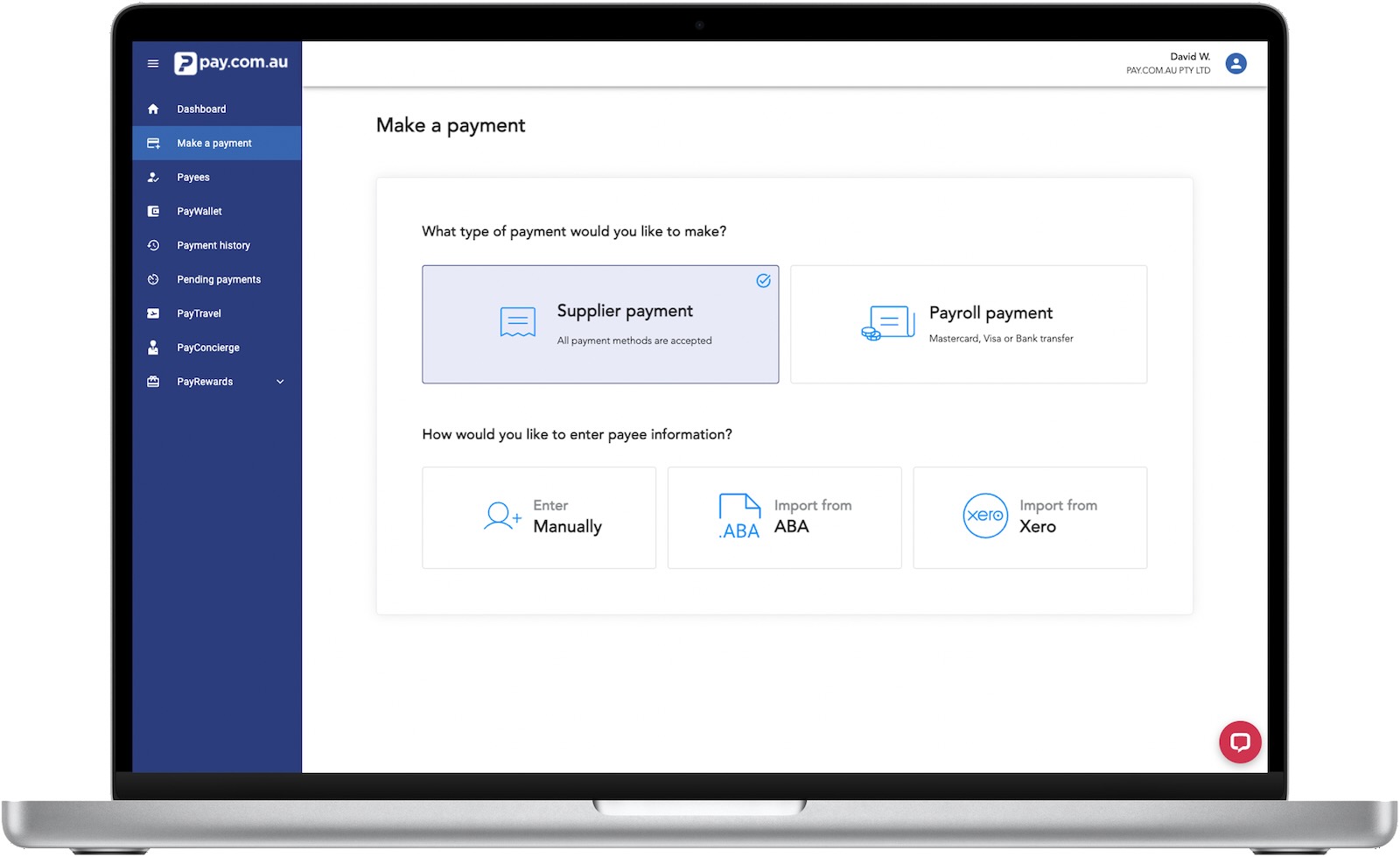
Such expenses include payments to government bodies or the ATO. These types of costs are usually businesses’ most significant expenses, which is why the Pay platform is so rewarding for companies.
Pay has since expanded to include BPay transactions, introduce its own PayRewards program, and allow businesses to earn points on bank transfer transactions. There’s also now the ability to earn points while getting paid, as well as make international payments.
How much does Pay cost?
The fees charged through Pay are dependent on the type of payment card that you use, along with the Pay Plan that you are currently on.
| Free | Regular | Premium | |
| Monthly Fee | Free | $85 | $165 |
| Payment Processing Fee: Mastercard* | 1.00% | 0.90% | 0.80% |
| Payment Processing Fee: VISA* | 1.20% | 1.10% | 1.00% |
| Payment Processing Fee: American Express (tiered by volume – see below)* | |||
| $0-$99,999 $100,000-$499,999 $500,000-$999,999 $1,000,000+ | 2.10% 2.05% 2.00% 1.95% | 2.05% 2.00% 1.95% 1.90% | 1.90% 1.85% 1.80% 1.75% |
| Payment Processing Fee: Bank Transfer | Varies on package | Varies on package | Varies on package |
As with most other B2B payment processors, fees are exclusive of GST. Businesses will need to pay GST on the payment fees upfront, but may be able to claim a portion of it (and the payment fee itself) back through the ATO. This is general advice only. Consult a qualified accountant or financial adviser for personalised information.
How does Pay compare to its rivals?
The table below shows how Pay compares with other similar platforms. These include B2BPay, RewardPay and Payment Logic. Here is a quick comparison of the services offered.
 Pay.com.au | Payment Logic | RewardPay | B2BPay | |
| All major credit cards | ✓ | – | – | ✓ |
| Cheapest rates | ✓ | – | – | – |
| Points Concierge | ✓ | – | – | – |
| Seamless customer interface with accounting integrations | ✓ | ✓ | – | ✓ |
| Travel bookings & points redemption service | ✓ | – | – | – |
| Flexible Rewards Currency | ✓ | – | – | – |
As you can see, Pay is very competitive against its major rivals. But what makes it stand out from the rest is an additional feature unique to Pay.com.au: PayRewards.
What is PayRewards?
PayRewards is the in-house, flexible points loyalty program for Pay.
In addition to earning reward points from your point-earning payment card, Pay customers can also earn additional points through PayRewards, known as PayRewards Points. There’s a double-dip opportunity here!
Any PayRewards Points earned can then be redeemed for various rewards, including transferring to frequent flyer partners. Currently, there are 16 transfer partners:
- Qantas Business Rewards
- Singapore Airlines KrisFlyer
- Virgin Business Flyer
- United Airlines MileagePlus
- Qatar Airways Privilege Club
- Asia Miles
- Air Canada Aeroplan
- Japan Airlines Mileage Bank
- ALL Accor Live Limitless
- Marriott Bonvoy
- IHG One Rewards
- Hilton Honors
- Vietnam Airlines Lotusmiles
- Thai Airways Royal Orchid Plus
- British Airways Club
- China Southern Airlines
Eligible Pay customers also have exclusive access to a luxury concierge service that will help you fulfil almost any reward request they can dream of.
How can I earn PayRewards points?
You can earn PayRewards Points with all transactions made through Pay, regardless of your payment method. Using a credit card or debit card or just transferring funds from a bank account can earn you PayRewards Points.
However, you must select a PayRewards Points earning tier (at an additional fee) when finalising your Pay.com.au transaction to be eligible to earn PayRewards Points. There are two tiers, offering 1 PayRewards Point or 2 PayRewards Points per dollar, respectively.
The number of PayRewards points you earn per dollar processed through Pay, along with the tier cost, is as follows:
| No PayRewards tier selected | Tier 1 (1 point per dollar) | Tier 2 (2 points per dollar) |
| No PayRewards points earned | 1 PayRewards point per $1 | 2 PayRewards points per $1 |
| No extra cost | 1.0% ex GST on top of your Pay processing fee | 1.8% ex GST on top of your Pay processing fee |
To double-dip on your points, you will also need to use a points-earning payment card in addition to selecting one of those two PayRewards-earning options.
Looking at it mathematically, Tier 2 offers the best value for money. Choosing this tier provides 2 PayRewards points per $1 at 1.8% ex GST, versus 1 PayRewards point per $1 at 1.0% ex GST.
You can now also earn points on money coming into your account, not just going out.
Receiving Payments
This new feature allows you to earn Pay Points on incoming payments into your account. It’s worth noting that anyone sending you money does not need a Pay.com.au account to pay you; they can simply use their normal bank transfer. Here’s how it works:
- Set up a business-branded PayID or BSB/account number through Pay
- Add those details to your existing invoices
- When customers pay via bank transfer, the funds settle to your nominated account by 2 pm Melbourne time each business day
- You earn PayRewards Points on every dollar received
- An email confirmation is sent the moment the payment is received
- Points are issued alongside the daily settlement summary
- Tax receipts are provided per transaction
International Payments
Pay.com.au now also supports international business payments to earn points. This includes the US, UK, Canada, Hong Kong, New Zealand, Singapore, and 24 European countries, representing over 11 currencies.
Until now, Pay.com.au has been focused on domestic bill and supplier payments. With the new international capability, users can send money abroad in USD, GBP, EUR, SGD, HKD, CAD, and NZD in partnership with SendFX. More currencies are expected to be added over time.
Transactions can be funded via bank transfer or credit card, and users see a live foreign exchange rate before confirming. The rate is locked in for a short window (around 2.5 minutes), giving more control over timing and costs.
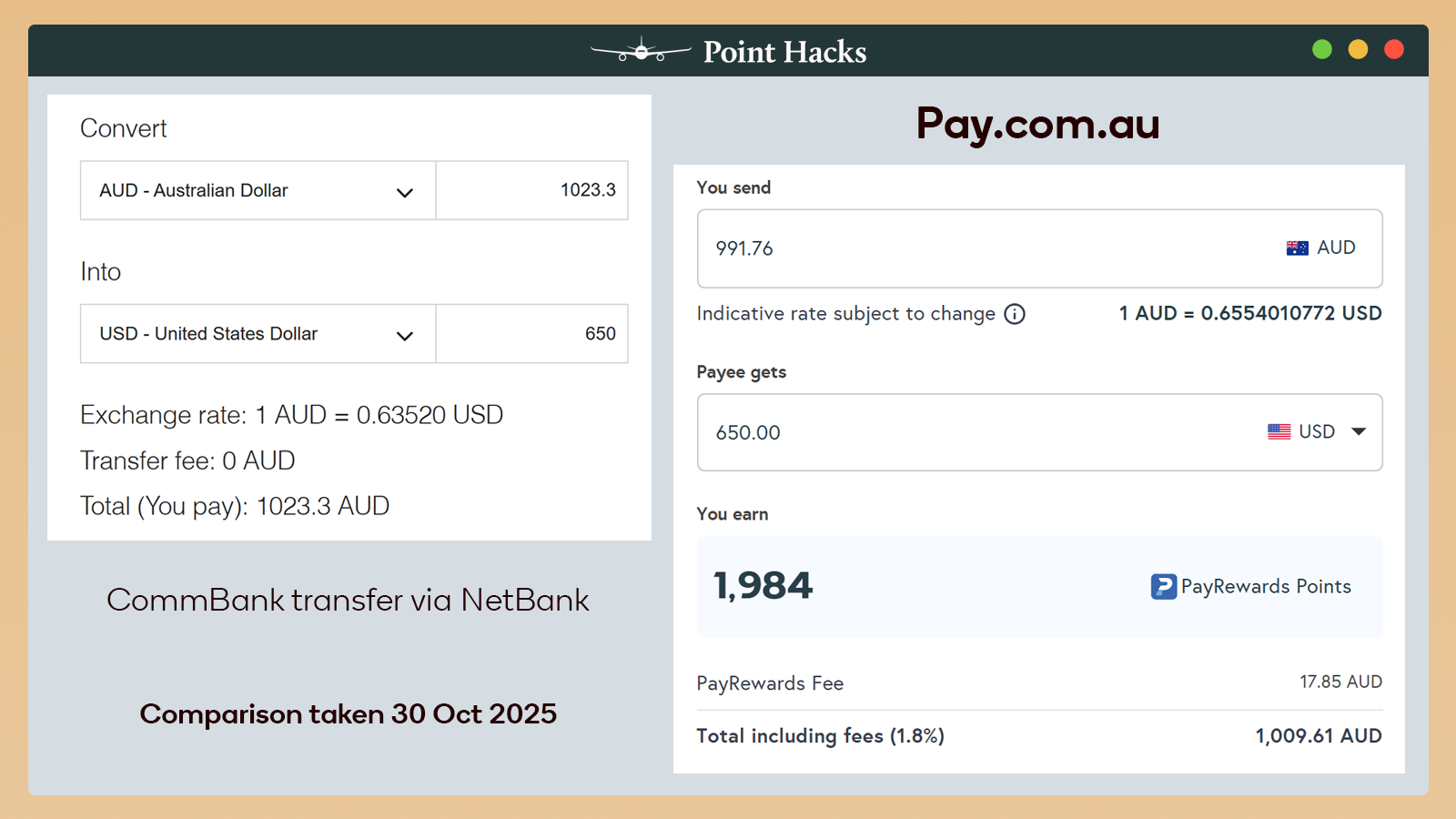
Speaking of the rate, you can generally expect it to be better than that of the ‘Big 4’ banks. In the comparison below, Pay.com.au is cheaper than CommBank by A$13.69 to send US$650 overseas – and that’s already including the optional 1.8% fee to earn 2 PayRewards points per dollar.
Where can I redeem my PayRewards Points?
There are two main ways to redeem PayRewards points, as shown below.
1. Convert your PayRewards points to major partners
PayRewards is a flexible points program. You can transfer your PayRewards points to 16 partners, including Qantas Business Rewards, Singapore Airlines KrisFlyer, Virgin Australia Business Flyer and more. This allows members to direct their reward points to the partners of their choice at any time.
The conversion rate from PayRewards to its transfer partners varies:
- 4 PayRewards points = 1 ALL point
- 3 PayRewards points = 1 Cathay Asia Mile, Thai Royal Orchid Plus Mile, United Airlines MileagePlus Mile, Japan Airlines Mileage Bank Mile, China Southern Mile, British Airways Avios and Qatar Airways Privilege Club Avios
- 2.5 PayRewards Points = 1 Singapore Airlines KrisFlyer Mile, Vietnam Airlines Lotusmiles Mile and Aeroplan Point
- 2 PayRewards points = 1 Qantas Point, Velocity Point, IHG One Rewards Point
- 1.75 PayRewards points = Marriott Bonvoy Point, Hilton Honors Point
For airlines with the original 2.5 to 1 transfer rate, the effective frequent flyer point/mile earn rate for every $1 processed through Pay is:
| No PayRewards tier selected | Tier 1 | Tier 2 |
| No frequent flyer points/miles | 0.4 frequent flyer points/miles | 0.8 frequent flyer points/miles |
2. PayTravel
If you want assistance redeeming your frequent flyer points into flight rewards, then the PayTravel team can assist.
PayTravel helps Pay customers get the best value out of their frequent flyer points. The team can help you redeem your frequent flyer points for reward seats, especially those in Business and First Class. And if your travel itinerary is complex, the PayTravel team can help there, too.
For example, if you have multiple flights or stopovers or are looking to travel part of your itinerary on the road and require more complicated open-jaw tickets, help is at hand.

Note that the service is not limited to points you earn through PayRewards. All your points balances that you own can be used. The great news is that PayTravel is open to all members. The number of travel bookings offered on a complimentary basis per year is dependent on your Pay subscription plan as follows:
| 1. Free Plan | 2. Regular Plan | 3. Premium Plan |
| Pay per single PayTravel service with no ongoing subscription. ✓ Access PayTravel for International and Domestic bookings at $250 per person. | $1000/worth of value ✓ 2 annual international travel booking ✓ two annual domestic travel booking | $1000/worth of value ✓ 2 annual international travel booking ✓ 2 annual domestic travel booking |
3. Convert your PayRewards points through PayConcierge
This is where you can get creative! Pay has partnered with global luxury concierge service Quintessentially to provide a range of tailored rewards to meet your every desire.

Fancy a First Class trip to Santorini? No worries. How about adding a new Rolex watch to your collection? It’s just a phone call away. And a Porsche 911 as a new addition to your garage? Surely not? But most definitely, yes!
The above rewards are just a few examples. Throw in last-minute restaurant reservations and sold-out sporting events into the mix. As well as in-home support or assistance sourcing the perfect gift for a loved one.
In other words, PayConcierge will look to cater to your every whim. And it is available to all eligible Pay members.
To be eligible for PayConcierge, you must make a $5,000 transaction through the platform. The service is then valid for 30 days from that date. Of course, put multiple $5,000 transactions through, and the validity date keeps extending.
Should I opt-in to PayRewards?
There are two types of Pay customers. The first are those with low to modest Qantas Points, Velocity Points or KrisFlyer miles balances and are looking to supercharge their balances.
The second are those that have more frequent flyer points than they know what to do with. These customers might be less inclined to want Qantas Points or KrisFlyer miles, and instead would seek other rewards, or in other words, ‘cash equivalent’ rewards.
Depending on which group you fall into will determine which form of payment type and PayRewards tier (if any) you should select.
Let’s take a look at an example
Let’s assume your business puts through $7 million of expenses into Pay. The table below compares the net value created after considering the value of points earned and associated fees for three scenarios.
Firstly, the table is split into five columns incorporating the different payment methods and available PayRewards tier (if any) combinations. These include using:
- American Express Platinum Business Card as a ‘Free’ member
- Bank Account with Tier 1 rewards
- Bank Account with Tier 2 rewards
- American Express Platinum Business Card as a ‘Regular’ member
- American Express Platinum Business Card as a ‘Premium’ member
Secondly, the table shows the net estimated values for all five combinations above. This includes when members convert their American Express Rewards or PayRewards Points (whichever is relevant) into Qantas Points or Velocity Points (third line from bottom). Also, when members convert their American Express Rewards or PayRewards Points (whichever is relevant) into ‘cash equivalent rewards’ (bottom line).
| American Express Platinum Business Card only | Bank Account with Tier 1 PayRewards | Bank Account with Tier 2 PayRewards | American Express Platinum Business Card + Tier 1 PayRewards (Regular member) | American Express Platinum Business Card + Tier 2 PayRewards (Premium member) | |
| Supplier payment amount ($) | $7,000,000 | $7,000,000 | $7,000,000 | $7,000,000 | $7,000,000 |
| Processing fee (%, ex GST) | 2.1% | 1% | 1.8% | 3.05% (2.05% Amex + 1% PayRewards Tier 1) | 3.7% (1.9% Amex + 1.8% PayRewards Tier 2) |
| Gross processing fee ($, ex GST) | $147,000 | $70,000 | $126,000 | $213,500 | $259,000 |
| Net processing fee ($)~ | $102,900 | $49,000 | $88,200 | $149,450 | $181,300 |
| Points earn (pts/$) | 2.25 Amex Points | 1 PayRewards point | 2 PayRewards points | 2.25 Amex Points + 1 PayRewards point | 2.25 Amex Points + 2 PayRewards points |
| Amex Points | 16,080,750 | N/A | N/A | 16,230,375 | 16,332,750 |
| PayRewards points | N/A | 7,000,000 | 14,000,000 | 7,000,000 | 14,000,000 |
| Converted to Qantas or Velocity Points | 8,040,375 | 3,500,000 | 7,000,000 | 11,615,187 | 15,166,375 |
| Effective cost per Qantas Point or Velocity Point ($) | 0.01279 | 0.014 | 0.0126 | 0.0128 | 0.0119 |
| Estimated Value in Qantas Points or Velocity Points ($)* | $281,413 | $122,500 | $245,000 | $406,531 | $530,823 |
| Net estimated Value for Qantas or Velocity Points conversion ($) # | $178,513 | $73,500 | $156,800 | $257,081 | $349,523 |
| Estimated Value when converted to ‘cash equivalent’ conversion ($)^ | $80,403 | $52,500 | $105,000 | $133,651 | $186,663 |
| Net Estimated Value for ‘cash equivalent’ conversion ($) | -$22,497 | $3,500 | $16,800 | -$15,799 | -$5,363 |
The above table shows that the preferred combination of payment platform and PayRewards membership depends on what type of PayRewards customer you are.
Are you chasing as many Qantas Points or Velocity Points as possible?
Select: Points-earning payment card + Tier 2 PayRewards
If maxing out your points-earning potential is your main goal, then using a points-earning payment card and selecting the Tier 2 is your best bet. This is because it gives you the greatest net value when converting your credit card and PayRewards points, after factoring in all associated costs.
In the example above, your company processing $7 million in expenses through Pay would come out with an estimated net value of $349,523 based on our assumptions. This is far greater than any other options displayed.
Or are you looking for more ‘cash equivalent’ rewards
Select: Bank Account + Tier 2 PayRewards
If, however, your Qantas Points or Velocity Points balances are not in need of a serious points injection, at least for now, then another combination is the better option for you. And that option is Bank Account and Tier 2 PayRewards. You get the greatest net value when converting your points to a ‘cash equivalent’ reward.
In fact, based on our example, your net value gained is $16,800 based on our assumptions, compared to lower or even negative net values for other combinations.
Summing up
The advent of third-party platforms into the market has been a boon for businesses and points chasers alike. Expenses that previously had no chance of being points-earning were now very much that!
And there are a number of third-party payment platforms out there. But pay.com.au has taken it a step further. The introduction of PayRewards allows customers to earn even more rewards points on top of their normal credit card points. As such, customers can tailor their points-earning options to get the maximum value based on their points-earning goals.
So, there’s no time like the present to get your business’s reward points soaring.
Frequently asked questions
- pay.com.au customers receive 20,000 Bonus PayRewards points when $10,000 or more is processed their first month with an eligible payment method.
- Payments must be made within the first month as a pay.com.au account holder.
- Eligible payment methods on the pay.com.au payments platform are credit card transactions or bank transfers where PayRewards are earned.
- The bonus PayRewards points will be allocated to your pay.com.au account within 30 days of qualifying for the offer.
- Offer only valid for existing customers who sign up with referral code – PHACKS22
- pay.com.au reserves the right to refuse to redeem for anything that is deemed prohibited, subject to Terms and Conditions.
- pay.com.au reserves the right to amend or withdraw this offer at any time without notice.
- Offer limited to one business per user.
- Offer cannot be used in conjunction with other offers.
Disclaimer: Point Hacks is affiliated with Pay.com.au